
Historically - computers stored, transmitted and processed numeric values only. Once the need for working with text presented itself, a new challenge appeared.
As always, lots of entities developed their ways of text encoding - which soon has proven inefficient in multiple ways, most notably - interoperability.
Computers needed a standardized way to map characters to numbers and vice versa. This need for standardization led to a character encoding system such as ASCII and later to Unicode which was/is a character standard that mapped characters to code points. Closing with UTF-8 (Unicode Transformation Format) that defined how those code points are stored, processed and transmitted.
ASCII - (American Standard Code for Information Interchange)
ASCII managed to represent 127 characters as almost 1-byte value, precisely 7 bit values, with most significant bit always being '0'. MSB was historically used as a parity bit for error detection.

127 characters were enough to store lowercase/uppercase latin alphabet characters, 0-9, some symbols and control characters. Control characters are non-printable characters and are mostly used to instruct a new line(0x0A), initiate an escape sequence(0x1B) or control peripherals.
Fun fact with ASCII - conversion from uppercase to lowercase and vice versa is super convenient - as you only have to flip the 6th bit.
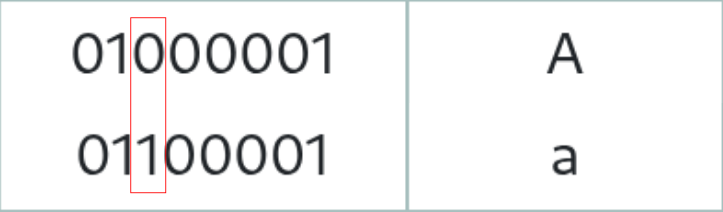
We can write a simple proof of concept code by simply XOR-ing wanted input value with a 00100000(2) - 0x20(16) bitmask.
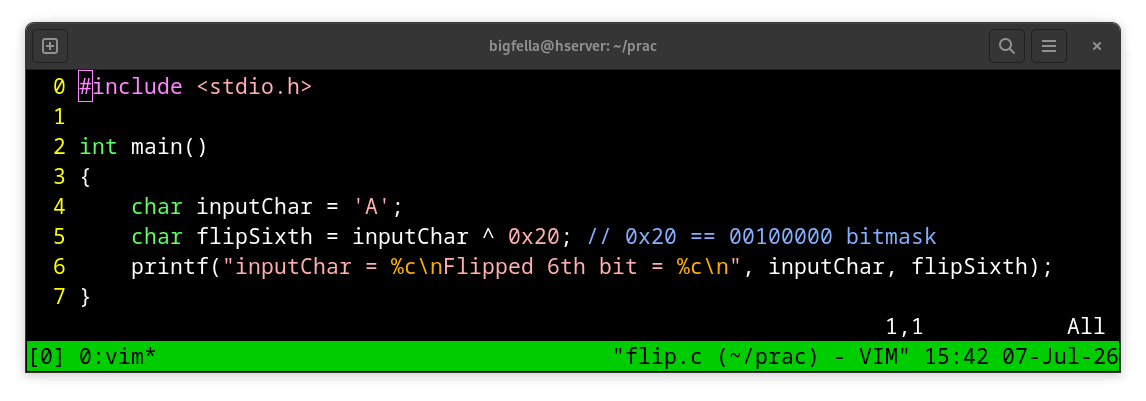
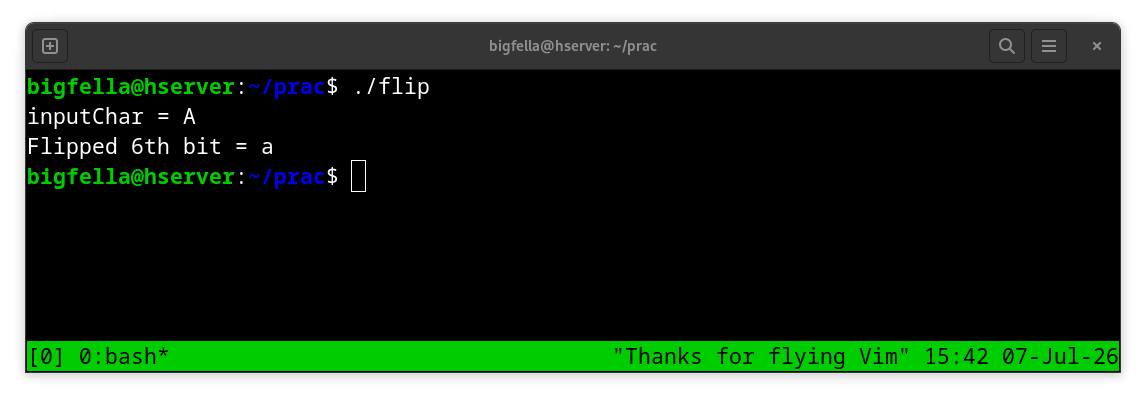
Okay, so we have 127 characters as 7 bit values, but what about everything else in the whole wide world - cyrillic, asian scripts, historic letters, emojis... We obviously need more then a byte to store everything else, but the problem was how do we preserve backward and forward compatibility with ASCII.
Unicode
Unicode assigns all possible characters as 'code-points' with highest possible code-point being U+10FFFF (000100001111111111111111) - 21 bit long in binary - when we strip leading zeros. If we would to store this 3 bytes in memory, we would have difficulties differentiating from ASCII characters and what not, this is why a standardized encoding was needed.
UTF-8 (Unicode Transformation Format)
UTF-8 answered the "how do I store Unicode code points as bytes" question and solved several problems along the way, with one most notable being the "how do I preserve backward and forwards compatibility with ASCII"
Because historically ASCII used MSB as parity bit, all ASCII characters have MSB set to '0' and that was a good way to differentiate between ASCII and everything above ASCII.
They came up with following rules:
- If the examined byte has its MSB set to 0 - it is a 1-byte fixed-width ASCII character.
- If the examined byte has its MSB set to 1 - it can be 2-4 bytes variable-width Unicode code-point.
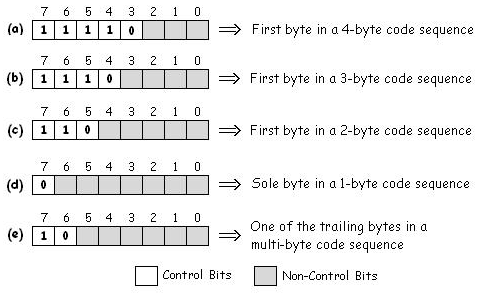
Number of 1s from MSB to LSB - enclosed with 0, will determine if we are looking in to 2,3 or 4-byte code sequence.
If we are walking through memory and we come up to a byte with MSB set to 1 and 7th bit set to 0 (example e - 10xxxxxx), we know that we are in the middle of a Unicode character, and we have to walk backwards 3-bytes at most (in 4-byte code sequence), so we land to a leading byte (examples a,b,c) - so we can start our decoding from there on. This is also known as self-synchronization.
Lets now utf-8 encode "ӂ" - U+04C2.
04C2 translates in to "010011000010" binary, we can get rid of MSB 0 and we are left with 11 bit value. We can store those 11 bits in 2 bytes, from which we will need 5 bits used as control bits to signal that we are looking at 2-byte code sequence.
U+04C2 = 11010011 10000010(utf-8) = 10011000010(2).
Bold bits are control bits - as can be seen in Figure above.
Walking the bytes
Lets have some fun in C by walking each byte of a user input and determine if given byte is either fixed 1-byte (ascii), leading or continuation byte of a variable-byte code sequence.
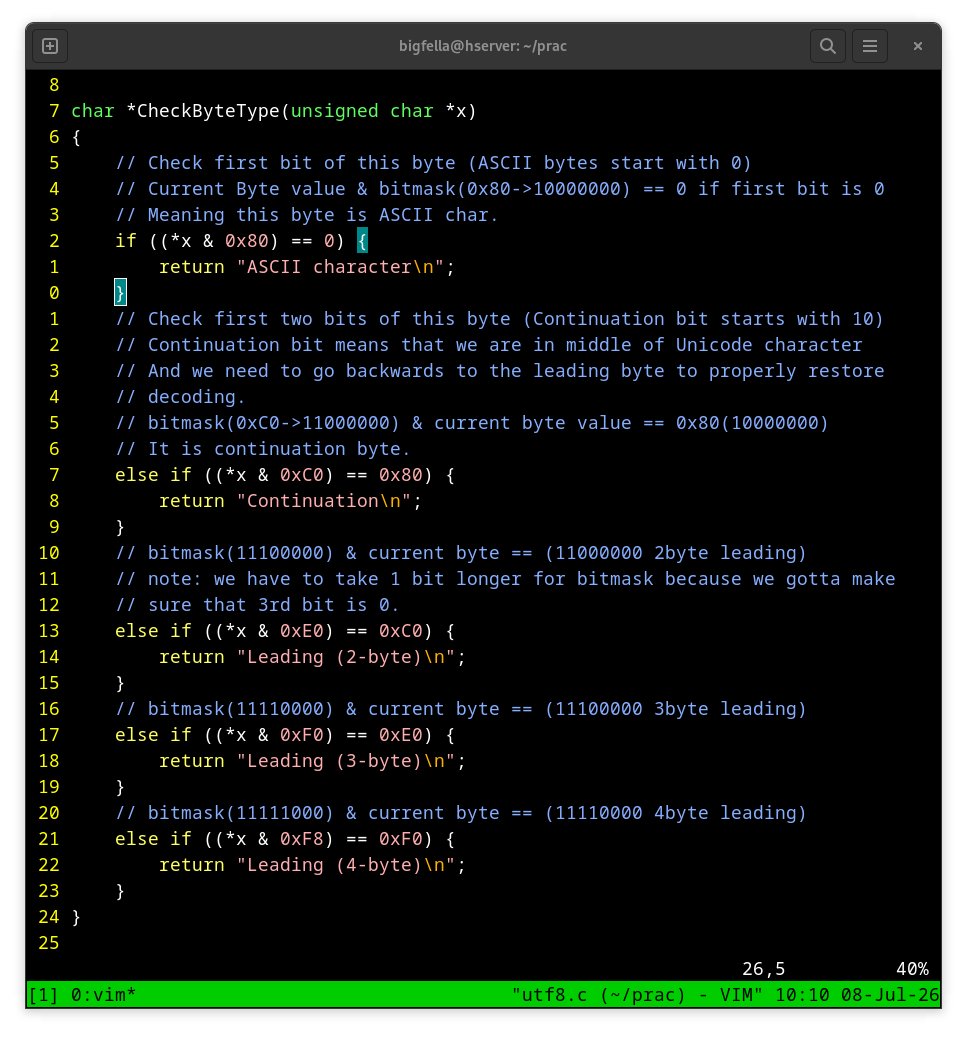
Lets see this in action and go through it later on step by step.
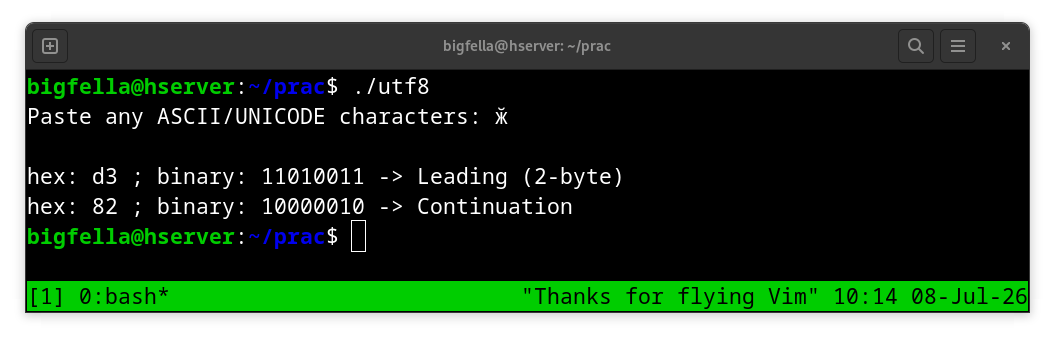
So the first byte it received is "11010011" - when we eventually bitwise AND it with a bitmask of 0xE0(16) - 11100000(2) and the results ends up being equal to 0xC0(16) - 11000000(2) - we know for a fact that we are looking at a leading byte of a 2-byte code sequence.
Second byte it received is "10000010" - when we AND it with a bitmask of 0xC0(16) - 11000000(2) - we get a result of 10000000(2) - 0x80(16) so we know it is a continuation byte.
If this was a 3 or 4-byte long code sequence, the principle would stay the same.
Binary visualization
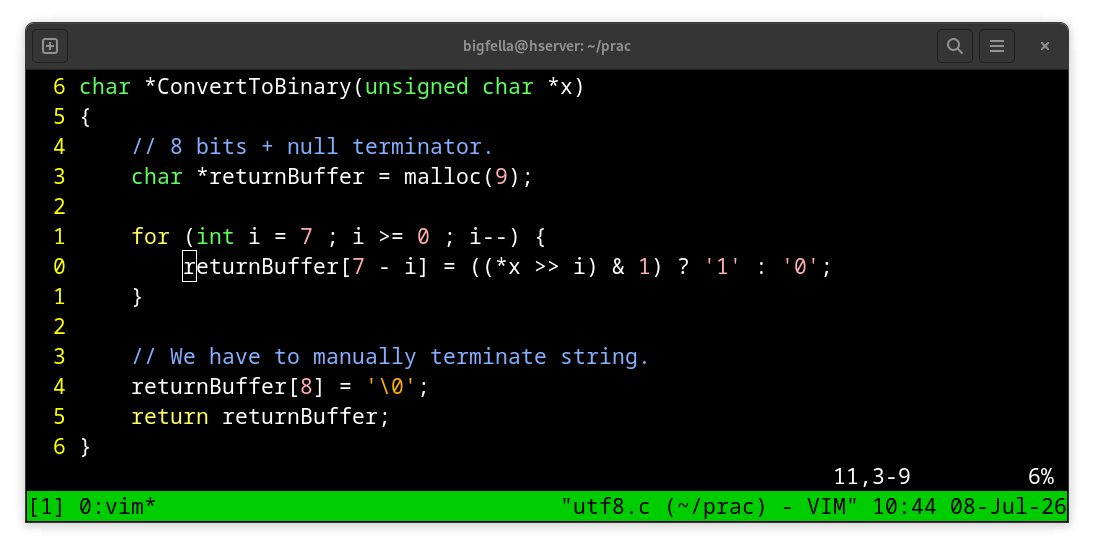
The same pointer to a character array (string) that was passed to CheckByteType - gets passed to ConvertToBinary for visualization purpose in stdout.
We know that we have to return 8 characters to represent a binary and character is 1-byte long + null terminator - thus we are allocating 9 bytes on the heap for this.
We are starting from the MSB and walking downwards to the LSB. We are bit shifting dereferenced value that got passed to this function (0xD3 - 11010011) 7 positions to the right - Thus moving the bit located on 7th index (MSB) to the LSB position, after which it gets bitwise AND-ed with 1 - 00000001(2) - and if a result is true (1) - '1' gets stored as a first element (index 0) inside returnBuffer character array. This goes on for the remaining 7 bits, shifting each bit to LSB position and AND-ing it with a '1' to determine if it is a 1 or 0, finally giving us a binary to return.
#include <stdio.h>
#include <string.h>
#include <stdlib.h>

char *ConvertToBinary(unsigned char *x)
{
	// 8 bits + null terminator.
	char *returnBuffer = malloc(9);

	for (int i = 7 ; i >= 0 ; i--) {
		returnBuffer[7 - i] = ((*x >> i) & 1) ? '1' : '0';
	}

	// We have to manually terminate string.
	returnBuffer[8] = '\0';
	return returnBuffer;
}

char *CheckByteType(unsigned char *x)
{
	// Check first bit of this byte (ASCII bytes start with 0)
	// Current Byte value & bitmask(0x80->10000000) == 0 if first bit is 0
	// Meaning this byte is ASCII char.
	if ((*x & 0x80) == 0) {
		return "ASCII character\n";
    }
	// Check first two bits of this byte (Continuation bit starts with 10)
	// Continuation bit means that we are in middle of Unicode character
	// And we need to go backwards to the leading byte to properly restore
	// decoding.
	// bitmask(0xC0->11000000) & current byte value == 0x80(10000000)
	// It is continuation byte.
    else if ((*x & 0xC0) == 0x80) {
        return "Continuation\n";
    }
	// bitmask(11100000) & current byte == (11000000 2byte leading)
	// note: we have to take 1 bit longer for bitmask because we gotta make
	// sure that 3rd bit is 0.
    else if ((*x & 0xE0) == 0xC0) {
        return "Leading (2-byte)\n";
    }
	// bitmask(11110000) & current byte == (11100000 3byte leading)
    else if ((*x & 0xF0) == 0xE0) {
        return "Leading (3-byte)\n";
    }
	// bitmask(11111000) & current byte == (11110000 4byte leading)
    else if ((*x & 0xF8) == 0xF0) {
        return "Leading (4-byte)\n";
    }
}

int main()
{
	// User input ascii/unicode
	char userInput[1024];
	printf("Paste any ASCII/UNICODE characters: ");
	fgets(userInput, sizeof userInput, stdin);
	printf("\n");

	// Remove trailing newline (Enter "\n")
	size_t userInputLen = strlen(userInput);
	if (userInputLen > 0 && userInput[userInputLen - 1] == '\n')
		userInput[userInputLen - 1] = '\0';
	unsigned char *x = userInput;

	while (*x != '\0') {
		char *binary = ConvertToBinary(x);
		printf("hex: %x ; binary: %s -> %s",
				*x,
				binary,
				CheckByteType(x)
				);
		x++;
		free(binary);
	}
}
utf8.c
What are you doing all the way down here, you psycho ^^
As always,
Stay safe, stay healthy
Cheers,
bigfella